Shadow Weather
- 4.5
- Rating
- 100.00K
- Installs
- Free
- Price
 Analysis by App-foxy
Weather apps are easy to overlook until the forecast affects a real decision: whether I walk to work, leave a picnic set up, drive across town, or wait out a storm. Shadow Weather takes a more alert, conditions-focused approach than a basic temperature screen. It is a free weather app from Shadow Weather LLC, designed around current conditions, lightning activity, and severe storm awareness rather than a simple daily forecast.
After using it, I see the main appeal clearly: it tries to help me understand what is happening around me right now, not just what the weather may look like later. That makes it especially useful when the sky is changing quickly. The app is available to everyone, works on Android 7.0 and later, and its current version is 3.6.0. It has built a solid audience, with over 100 thousand installs and a 4.5 average from around 5 thousand ratings.
My short verdict is this: Shadow Weather is a good choice for people who want more awareness during unsettled weather, particularly when lightning or severe storms are a concern. It is less compelling for someone who only wants a quick temperature, a minimalist forecast, or a completely free experience without optional purchases.
You May Also Like

 Blood Strike: 2.5 Anniversary
Blood Strike’s Loadouts Turn Every Drop Into a Tactical Gamble
A close look at Blood Strike’s custom loadouts: how fast access to signature weapons reshapes its battle royale rhythm, rewards preparation, and narrows the gap between fights.

 Pandora - Music & Podcasts
Pandora’s Music Is Easy to Start, but Harder to Recover
Pandora’s strength is its low-effort path from a seed to a station. Its weak spot is how much confidence it asks you to place in connection, setup, and quiet recovery.

 8 Ball Pool
 Is Built on Rivalries, Rematches, and Routine
A close look at the rivalries, rematches, shared routines, and unanswered safety questions that turn a quick pool match into a persistent mobile community.

 Samsung Music
’s Quiet Strength Is Playing What You Already Own
Its reach comes less from spectacle than from dependable access to a personal library. That simplicity is both the app’s strongest retention engine and its ceiling.

 AccuWeather: Weather Radar
AccuWeather Review: A Quick, Clear Forecast for Everyday Decisions
For everyday plans, the best forecast is the one you can understand quickly. AccuWeather makes rain timing, radar, and local conditions easy to act on, with a few trade-offs.

 Hill Climb Racing
Why Hill Climb Racing Still Turns Crashes Into One More Run
A tiny car, a bumpy hill and one more upgrade: Hill Climb Racing keeps resurfacing because its simple chaos makes every near-miss feel personal.
More From Our News Desk



How Shadow Weather feels in everyday use
I find Shadow Weather most useful when the weather is changing and I need to decide what to do next, rather than when I only want a temperature check. In this section, I’ll focus on how that storm-aware approach fits into quick everyday decisions and where it saves me a little uncertainty. The next section turns to what the current release means for people who already use it or are considering trying it now.
A weather app built around changing conditions
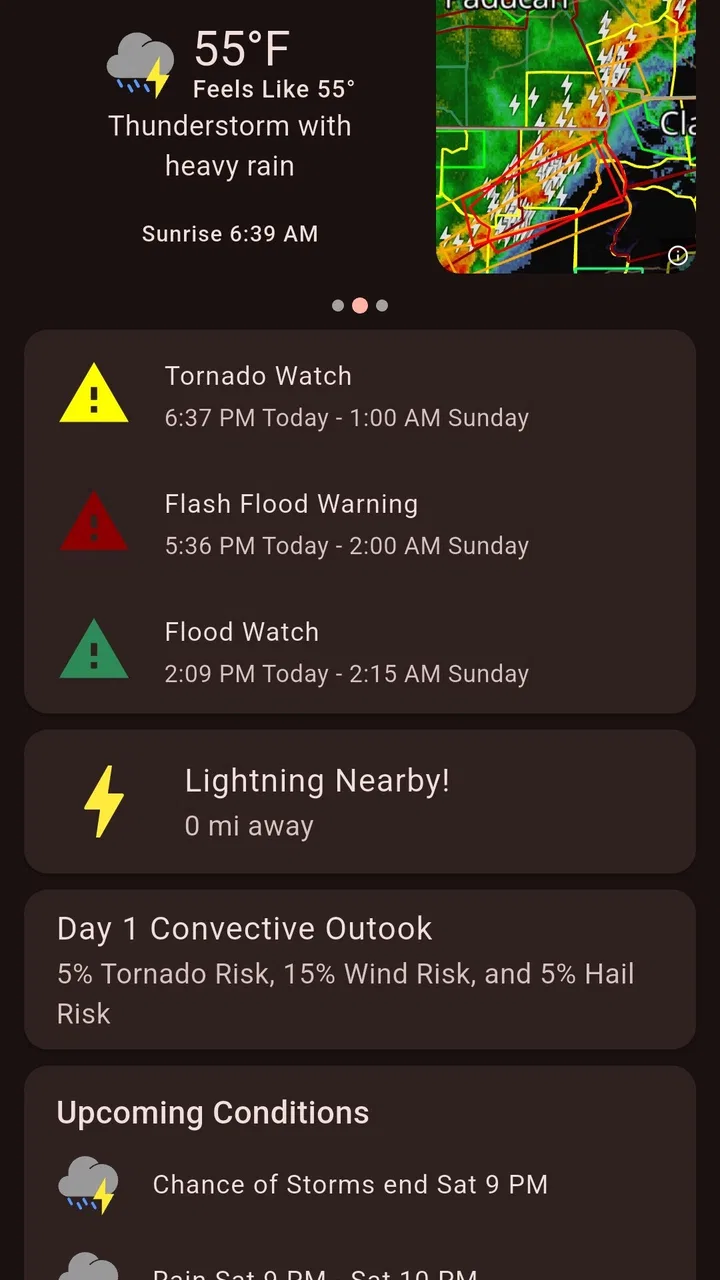
The first thing I noticed is that Shadow Weather feels more useful when conditions are active. A standard weather app can tell me that rain is expected, but that information does not always answer the practical question: is the rain approaching now, is lightning nearby, or is the situation becoming more serious? Shadow Weather’s focus on live lightning tracking and severe storm tracking gives those questions more attention.
That focus changes how I use it. On a quiet morning, I may only glance at the current conditions and move on. On a day with dark clouds, scattered showers, or a storm forecast, I am more likely to open the app repeatedly and compare what I am seeing outside with the developing weather picture. It is not merely a replacement for a daily forecast; it works better as a quick situational-awareness tool.
A realistic example is an afternoon walk when the forecast looks uncertain. Instead of deciding only from the percentage of rain shown in a conventional app, I can check whether lightning activity is developing and whether the storm pattern appears to be moving toward my area. If the information suggests that conditions are worsening, I would postpone the walk rather than wait until thunder is already overhead.
Why the lightning focus matters
Lightning information is valuable because rain alone does not tell the whole story. A light shower may be inconvenient, while lightning changes the safety decision for outdoor activities. Shadow Weather’s emphasis makes sense for people who spend time cycling, hiking, coaching sports, working outdoors, or managing events that depend on the sky staying quiet.
I would not treat the app as a substitute for official emergency instructions, but I do find the lightning view useful for making earlier choices. It can encourage me to move indoors before a storm feels close enough to be obvious. That is one of the more practical differences between this app and a weather screen that mainly presents temperatures and icons.
There is also a useful psychological benefit. When weather is unsettled, repeatedly looking at a generic forecast can leave me guessing. A dedicated view of storm-related activity gives me something more concrete to monitor. It does not remove uncertainty, but it makes the decision process less dependent on looking out of the window every few minutes.
Who will get the most from it
Shadow Weather suits users who want current weather context without opening a full professional meteorology tool. It is a strong fit for outdoor workers, parents deciding whether children should remain outside, travelers driving through storm-prone areas, and anyone who wants to notice changing conditions before they become disruptive.
It can also help people who organize informal outdoor plans. If I am arranging a barbecue, a game, or a long walk, the most useful information is not always the high and low temperature. I want to know whether a storm is building during the time we will be outside. The app’s storm-oriented design makes that kind of check more natural.
On the other hand, I would skip it if my weather needs are extremely basic. Someone who only checks tomorrow’s temperature and rain chance may find the extra emphasis on live conditions unnecessary. A simple built-in phone weather widget can be faster for a one-second glance, especially when there is no active weather concern.
How it compares with ordinary weather alternatives
Most general weather apps try to cover everything: forecasts, radar, alerts, air quality, maps, widgets, and long-range planning. That broad approach is useful, but it can also bury the most urgent information among many panels. Shadow Weather feels more purposeful when my question is, “What is happening with this storm?” rather than, “What will the entire week look like?”
Compared with a default phone weather app, its advantage is the attention given to lightning and severe weather. Compared with a specialist radar service, its likely advantage is approachability. I do not always want a dense meteorological display with multiple layers and technical controls. Shadow Weather is more appealing when I need a fast, readable check before making a practical decision.
The trade-off is that a focused app may not replace every other weather tool. For detailed trip planning, climate comparisons, or highly technical radar analysis, I may still prefer a broader service. Shadow Weather earns its place by being more focused, not by being the only weather app I could ever need.
What has changed and what current users should know
When I look at the current version, I think less about the number itself and more about how to make the app useful in a routine: explore its main storm information before bad weather arrives, then check it at the moments a decision matters. I’ll also consider how its free entry point and optional purchases shape the choice for new and returning users. That practical perspective leads into the limits worth keeping in mind.
The current version as a sign of ongoing maintenance
The current release is version 3.6.0, and the app has been available since September 1, 2019. That history matters because it suggests Shadow Weather is not a brand-new experiment that has just appeared in the weather category. Existing users have had time to become familiar with its approach, while new users are joining a product with an established identity.
I would be careful, though, about reading a version number as proof that every part of the experience is perfect. A mature app can still have rough edges, and a newer version does not automatically mean that every device, location, or weather situation will feel equally smooth. What the current release does provide is a reasonable starting point for evaluating the app as it exists now, rather than judging an old build.
For someone returning after a long break, the best approach is to spend a few days checking the app during both calm and unsettled weather. That gives a more useful impression than opening it once under clear skies. The value of Shadow Weather becomes most apparent when there is something changing to observe.
What the evolution means for people already using it
Long-time users are likely to appreciate continuity more than dramatic reinvention. A weather app becomes part of a routine: open it in the morning, check before leaving, and look again when the sky changes. If the basic structure remains familiar, that routine is easier to keep. The current version gives existing users a reason to stay current without requiring them to relearn the whole purpose of the app.
New users should still take a moment to configure their preferred location and understand where the storm-related information appears. This is one of my practical tips: do not wait until a storm is already approaching to explore the interface. Learning the main screens during calm weather makes the app quicker to use when attention is limited.
Another useful habit is to compare the app with what is happening outside rather than treating one reading as an absolute answer. If the sky is changing rapidly, I would check the app, observe local conditions, and consult official warnings when the situation is serious. This layered workflow is more sensible than depending on any single consumer weather app.
Free access and the role of optional purchases
Shadow Weather is free to download and use, which makes it easy to test without committing money first. Optional in-app purchases range from $0.99 to $12.99 per item. That pricing detail matters because the free experience may be enough for casual checking, while more committed users may decide that additional options are worth paying for.
I recommend starting with the free version during the exact situations that matter to you. Check it before commuting, during a stormy afternoon, and when planning an outdoor activity. If the app already answers your questions, there is no reason to buy anything simply because optional purchases exist. If you use it frequently and want more from the experience, then the purchase decision becomes easier to judge based on personal value rather than assumption.
The downside is that some users dislike any app that places useful extras behind purchases, even when the basic download is free. That is a fair concern. People looking for a completely unrestricted weather tool should examine the available free experience carefully before making Shadow Weather their only option.
Small workflow improvements that make it more useful
One of my strongest recommendations is to use Shadow Weather at decision points, not continuously. Open it before leaving home, before starting an outdoor activity, and when conditions shift. This avoids turning weather checking into a constant habit while still taking advantage of the app’s live-condition focus.
A second tip is to use lightning information as a reason to change plans early, not as confirmation that a storm is already dangerous. If I am supervising children outdoors or walking far from shelter, I would rather act while there is still time to get inside. The feature is most useful when it changes behavior before the weather becomes obvious.
A third trade-off is to pair the app with an ordinary forecast when planning several days ahead. Shadow Weather is more compelling for immediate awareness than for replacing every long-range planning tool. I would use a broad forecast for scheduling a trip and Shadow Weather for checking whether the current conditions are making that plan unsafe or uncomfortable.
Where the experience still has limits
No weather app can make rapidly changing conditions perfectly predictable at street level. Local geography, shifting storm cells, and differences between nearby locations can all affect what I experience. That means I would not make a serious safety decision from a single glance at any app, including this one.
There is also a learning curve created by the app’s focus. Users accustomed to a simple temperature card may initially wonder why they need more storm context. The answer depends on lifestyle. If I rarely spend time outside and live by a fixed indoor routine, the extra information may feel like clutter. If I regularly travel, exercise, work, or plan events outdoors, it becomes much more relevant.
The app may also feel less satisfying to people who want a full weather dashboard with every possible category in one place. Shadow Weather’s identity is clearer when I judge it as a conditions and storm-awareness app, not as a universal replacement for every specialized weather service.
Privacy, trust, and responsible use
Weather information can influence safety decisions, so trust matters more than visual polish. I prefer to treat consumer weather apps as helpful context and official warnings as the authority during genuinely dangerous events. Shadow Weather can help me notice a developing problem, but I would still follow local emergency guidance when conditions become severe.
That distinction is especially important for outdoor workers and event organizers. The app can support a decision workflow, but it should not be the only step. Check the current conditions, look for official warnings, identify nearby shelter, and be willing to cancel plans early. The best use of Shadow Weather is as one practical layer in that process.
What I would watch in future updates
For future development, I would want the app to preserve its clear storm-awareness identity while continuing to make quick decisions easier. The most valuable improvements would be those that reduce the time between opening the app and understanding whether conditions are becoming more concerning. Clarity matters more to me here than adding endless categories.
I would also watch how well the experience balances casual users with people who rely on weather information frequently. The free version needs to remain useful enough for newcomers to understand the app’s value, while optional purchases should feel like meaningful enhancements rather than barriers to basic awareness.
Existing users should pay attention to whether updates improve everyday reliability without making the interface harder to scan. A weather app is often opened quickly, sometimes while I am already preparing to leave or deciding whether to seek shelter. Any evolution should support that brief, high-value interaction.
My final recommendation
Shadow Weather is a focused weather app that I would recommend to anyone who wants more than a temperature and a generic rain icon. Its attention to live lightning and severe storm conditions gives it a clear purpose, and the free entry point makes it straightforward to try. The developer, Shadow Weather LLC, has maintained the app long enough for it to become an established option rather than a passing novelty.
I would choose it for outdoor planning, storm awareness, and quick checks when conditions are changing. I would not choose it as my only tool for detailed long-range forecasting, official emergency information, or highly technical weather analysis. Those needs call for broader or more authoritative alternatives.
For me, the deciding question is simple: do you often need to know whether the weather is merely inconvenient or becoming unsafe? If the answer is yes, Shadow Weather has a useful role. If you only want a glance at tomorrow’s temperature, its storm-focused approach may be more than you need. Either way, the free version gives you a practical chance to test that fit before spending on optional features.
FAQs for Shadow Weather
01What is Shadow Weather, and what does it offer?
Shadow Weather is a weather app focused on providing detailed, location-based forecasts and weather conditions in a clean, information-rich interface. Depending on your selected location, it can display current temperature, feels-like conditions, precipitation, wind, humidity, visibility, and forecast changes. It is designed for users who want more detail than a basic weather widget, while still keeping everyday weather information easy to access.
02Is Shadow Weather free to download and use?
Shadow Weather can generally be downloaded for free, but some features may depend on the app’s current subscription or premium model. Basic forecasts and essential weather information may be available without payment, while advanced tools, additional forecast sources, customization options, or an ad-free experience could require a subscription. Before downloading, check the Google Play Store or App Store listing for the latest pricing and included features.
03How accurate are the forecasts in Shadow Weather?
Forecast accuracy in Shadow Weather depends on the weather data providers, your location, and how far ahead you are looking. Short-term forecasts are usually more dependable than predictions several days into the future, especially during rapidly changing conditions. The app is useful for planning daily activities, but it should not replace official emergency alerts or local authorities during severe weather, storms, flooding, or other dangerous conditions.
04Does Shadow Weather require location access?
Shadow Weather can use your device’s location to automatically provide forecasts for where you are, which is convenient when traveling or moving between areas. You may be able to deny location permission and add cities manually instead. If privacy is important to you, review the permission request carefully and choose only the access level you are comfortable with. Location behavior and available privacy controls may vary between Android and iOS.
05Does Shadow Weather provide severe weather alerts and notifications?
Shadow Weather may offer weather notifications or severe-condition information, but the exact alert types and availability can depend on your region, device settings, operating system, and the app’s current feature set. Notifications must normally be enabled in both the app and your phone’s system settings. For life-threatening weather, always rely on official government alerts and local emergency services, since third-party apps may not deliver every warning immediately.
Pros
- Clean
- minimalist interface makes forecasts easy to scan.
- Useful hourly and daily forecasts for planning ahead.
- Weather details are presented without unnecessary clutter.
- Location support helps track conditions in different places.
- Dark-themed design is comfortable in low-light conditions.
Cons
- Some features may require a subscription or in-app purchase.
- Forecast accuracy depends on the quality of available weather data.
- Limited customization compared with larger weather apps.
- The app may feel too simple for users wanting radar maps.
- Battery and location access may be needed for automatic updates.

Shadow Weather
Gallery